
1. API 명세서 관련 문제점 (엑셀, 노션 등…)
- Production 코드와의 불일치
- 문서에 대한 신뢰성 문제
- 비효율적인 커뮤니케이션
2. RestDocs VS Swagger
2-2. Swagger 장단점
장점
- 적용하기 쉽다.
- API 테스트 환경 제공
단점
- production 코드가 지저분해진다
@Operation(summary = "2. 비밀번호 찾기 -> 인증 번호 인증", description = "**성공 데이터:** 임시 토큰 쿠키 ")
@ApiResponses(value = {
        @ApiResponse(responseCode = "200", description = "인증번호 인증 성공"),
        @ApiResponse(responseCode = "400", description = "인증번호가 잘 못 되었습니다."),
})
ResponseEntity<?> verificationCode(VerificationCodeDto verificationCodeDto);
2-3. RestDocs 장단점
장점
- 테스트를 통과해야 문서가 만들어진다 (신뢰도↑)
- API 명세 최신화가 강제
- Production 코드에 영향이 없다. (메인 코드 즉 비즈니스 개발에 초점을 둘 수 있다.)
단점
- 어렵다 → 통합 테스트 기반으로 돌아가기 때문에 모든 API 테스트를 진행해야됨
- 테스트 코드 양이 많아 진다.
2-4. 결론
- Msa 환경에서는 RestDocs 혹은 OpenAPI Specification 를 통해 API 문서 서버를 두어 통합 관리 한다.
OpenAPI Specification == RestDocs + Swagger
RestDocs의 신뢰성있는 API 문서 데이터를 Swagger UI에 통합 하여 신뢰성 + 테스트 기능 까지 가능 하게 하는 문서화 기법이다.
3. RestDocs 사용법
3-1. 의존성 주입
plugins {
    id 'java'
    id 'org.springframework.boot' version '3.3.3'
    id 'io.spring.dependency-management' version '1.1.6'
    id 'org.asciidoctor.jvm.convert' version '3.3.2'
}

group = 'com.example'
version = '0.0.1-SNAPSHOT'

repositories {
    mavenCentral()
}

ext {
    set('snippetsDir', file("build/generated-snippets")) // 스니펫 dir 변수 선언 그 변수에는 스니펫 폴더를 넣겠다.
}

java {
    toolchain {
        languageVersion = JavaLanguageVersion.of(17)
    }
}

configurations {
    asciidoctorExtensions
    compileOnly {
        extendsFrom annotationProcessor
    }
}

repositories {
    mavenCentral()
}

dependencies {
    //spring
    implementation 'org.springframework.boot:spring-boot-starter-data-jpa'
    implementation 'org.springframework.boot:spring-boot-starter-web'

    //utility
    compileOnly 'org.projectlombok:lombok'
    annotationProcessor 'org.projectlombok:lombok'

    //db
    runtimeOnly 'com.h2database:h2'

    // test
    testImplementation 'org.springframework.boot:spring-boot-starter-test'
    testRuntimeOnly 'org.junit.platform:junit-platform-launcher'
    testImplementation 'org.springframework.restdocs:spring-restdocs-mockmvc'
    asciidoctorExtensions 'org.springframework.restdocs:spring-restdocs-asciidoctor'
}

tasks.named('test') {
    outputs.dir snippetsDir // Test 후 스니펫이라는 산출물 조각이 생기면 디렉토리를 지정
    useJUnitPlatform()
}

tasks.named('asciidoctor') {
    configurations "asciidoctorExtensions"
    inputs.dir snippetsDir // 스니펫이라는 조각을 html로 만들어줌
    dependsOn test // 빌드를 하면 여러개의 task가 실행됨 -> 즉 아스키는 test라는 test가 끝나고 실행 되겠다.
}

// 카피 다큐맨트: 재 빌드 후 html 파일을 지우고 재생성 -> 산출물 동기화
task copyDocument(type: Copy) {
    dependsOn asciidoctor // 아스키닥터가 끝난 뒤 실행 하겠다
    from file("${asciidoctor.outputDir}") // html 실제 저장된 파일을 아래의 정적 경로로 복사
    into file("src/main/resources/static/docs")
}

build {
    dependsOn copyDocument // 빌드는 카피다큐먼트가 끝난 이후에 실행
}
bootJar {
    dependsOn copyDocument
    from ("${asciidoctor.outputDir}") {
        into 'static/docs'
    }
}
3-2. 예시 테스트 코드 작성
간단한 도서 CURD 서버에서 테스트를 진행했습니다.
public interface ApiDocumentUtils {

    static OperationRequestPreprocessor getRequestPreProcessor() {
        return preprocessRequest(prettyPrint());
    }

    static OperationResponsePreprocessor getResponsePreProcessor() {
        return preprocessResponse(prettyPrint());
    }
}
package com.example.exp0906;
@SpringBootTest
@AutoConfigureMockMvc
@ExtendWith(RestDocumentationExtension.class)
public class BookIntegrationTest { // 통합 테스트
@Autowired
private BookRepository bookRepository;
private MockMvc mockMvc;
@BeforeEach
void setUpMockMvcForRestDocs(WebApplicationContext webApplicationContext,
RestDocumentationContextProvider restDocumentationContextProvider) {
this.mockMvc = MockMvcBuilders
.webAppContextSetup(webApplicationContext)
.apply(documentationConfiguration(restDocumentationContextProvider))
.build();
}
private ObjectMapper objectMapper = new ObjectMapper();
@BeforeEach
public void tearDown() {
bookRepository.deleteAll();
}
@Test
@DisplayName("[Books] 도서 생성 테스트")
void 도서_생성_테스트() throws Exception {
//given
BookReqDto bookReqDto = new BookReqDto("testBook", "testAuthor", 1234, "testGenre");
//when
ResultActions actions = mockMvc.perform(
post("/books")
.contentType(APPLICATION_JSON)
.accept(APPLICATION_JSON)
.content(objectMapper.writeValueAsString(bookReqDto))
);
//then
actions
.andExpect(status().isCreated())
.andExpect(jsonPath("$.success").isNotEmpty())
.andExpect(jsonPath("$.status").isNotEmpty())
.andExpect(jsonPath("$.code").isNotEmpty())
.andExpect(jsonPath("$.message").isNotEmpty())
.andExpect(jsonPath("$.response.id").isNotEmpty())
.andDo(document("Books-save",
getRequestPreProcessor(),
getResponsePreProcessor(),
requestFields(
fieldWithPath("title").description("Title for book").type(JsonFieldType.STRING),
fieldWithPath("author").description("Author for Book").type(JsonFieldType.STRING),
fieldWithPath("publishedYear").description("PublishedYear for Book").type(JsonFieldType.NUMBER),
fieldWithPath("genre").description("Genre for Book").type(JsonFieldType.STRING)
),
responseFields(
fieldWithPath("success").description("성공 유무"),
fieldWithPath("status").description("status"),
fieldWithPath("code").description("code"),
fieldWithPath("message").description("결과 메세지"),
fieldWithPath("response.id").description("Id for Book")
)
))
.andDo(print());
}
@Test
@DisplayName("[Books] 도서 상세 조회 테스트")
void 도서_상세_조회_테스트() throws Exception{
//given
BookReqDto bookReqDto = new BookReqDto("testBook", "testAuthor", 1234, "testGenre");
MvcResult result = mockMvc.perform(
post("/books")
.contentType(APPLICATION_JSON)
.content(objectMapper.writeValueAsString(bookReqDto))
)
.andExpect(status().isCreated())
.andExpect(jsonPath("$.success").isNotEmpty())
.andExpect(jsonPath("$.status").isNotEmpty())
.andExpect(jsonPath("$.code").isNotEmpty())
.andExpect(jsonPath("$.message").isNotEmpty())
.andExpect(jsonPath("$.response.id").isNotEmpty())
.andDo(print())
.andReturn();
JsonNode jsonNode = objectMapper.readTree(result.getResponse().getContentAsString());
Long bookId = jsonNode.get("response").get("id").asLong();
//when
ResultActions actions = mockMvc.perform(get("/books/{bookId}", bookId)
.contentType(APPLICATION_JSON)
);
//then
actions
.andExpect(status().isOk())
.andExpect(jsonPath("$.success").value("true"))
.andExpect(jsonPath("$.status").value("200"))
.andExpect(jsonPath("$.code").value("OK"))
.andExpect(jsonPath("$.message").value("성공적으로 처리되었습니다."))
.andExpect(jsonPath("$.response.title").value("testBook"))
.andExpect(jsonPath("$.response.author").value("testAuthor"))
.andExpect(jsonPath("$.response.publishedYear").value(1234))
.andExpect(jsonPath("$.response.genre").value("testGenre"))
.andDo(document("Books-findById",
getRequestPreProcessor(),
getResponsePreProcessor(),
pathParameters(parameterWithName("bookId").description("bookId for findBy id")),
responseFields(
fieldWithPath("success").description("성공 유무").type(JsonFieldType.BOOLEAN),
fieldWithPath("status").description("status").type(JsonFieldType.NUMBER),
fieldWithPath("code").description("code").type(JsonFieldType.STRING),
fieldWithPath("message").description("결과 메세지").type(JsonFieldType.STRING),
fieldWithPath("response.title").description("도서 제목").type(JsonFieldType.STRING),
fieldWithPath("response.author").description("도서 저자").type(JsonFieldType.STRING),
fieldWithPath("response.publishedYear").description("도서 출판일").type(JsonFieldType.NUMBER),
fieldWithPath("response.genre").description("도서 장르").type(JsonFieldType.STRING)
)))
.andDo(print());
}
}3-3. 스니펫 생성 방법
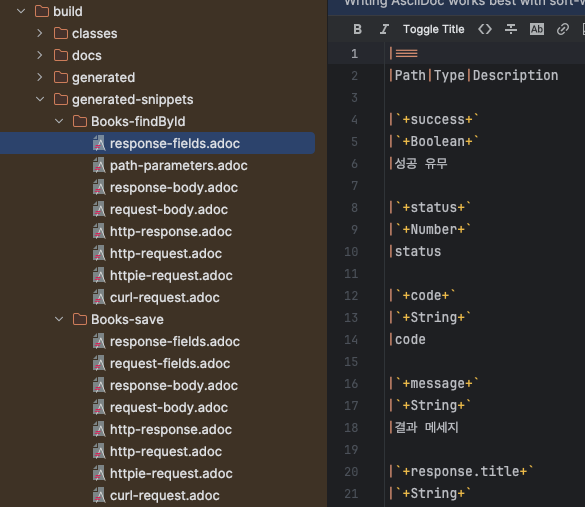
- 테스트를 실행한다. (Test를 통과해야지만 스니펫 조각이 생성이 됩니다. RestDocs의 장점 !)

- 스니펫 확인 (build → generated-snippets)
3-4. API 문서 html 추출 하기
- src → docs → asciiDoc → [원하는 adoc] 작성

[예시]
= FOSS Rest Docs _ Books
:doctype: book
:icons: front
:source-highlighter: highlighsjs
:toc: left
:toclevels: 1

[[Books-save]]
== Books-save
operation::Books-save[]

[[Books-findById]]
== Books-findById
operation::Books-findById[]- 빌드를 진행해 줍니다.

- 생성된 html 확인

4. 결과
API 문서가 정상적으로 생성되었습니다.

ref
https://techblog.woowahan.com/2678/
https://tech.kakaopay.com/post/openapi-documentation/
https://velog.io/@glencode/Spring-REST-Docs-적용하기-aka.-자동-API-문서화
'develop' 카테고리의 다른 글
| 교차 출처 리소스 공유 CORS 정리 (0) | 2024.09.30 |
|---|---|
| 언제 RDB 대신 MongoDB를 사용할까 (1) | 2024.09.26 |
| CQS (Command Query Separation) (0) | 2024.09.11 |
| @Setter 지양 (0) | 2024.09.11 |
| Velog -> Tistory 블로그 이전 (0) | 2024.09.09 |